
Showing posts with label Essentials. Show all posts
Showing posts with label Essentials. Show all posts
Saturday, August 15, 2009
Sunday, June 14, 2009
Exposure Compensation
Yesterday we talked about how to recognize when your camera has not properly exposed an image. So today let's talk about what to do when you notice something wrong.
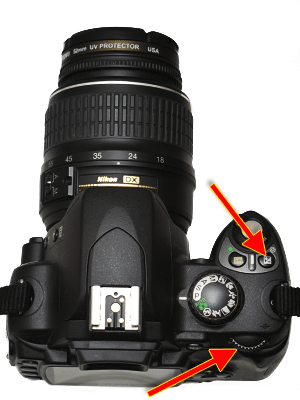
There are lots of things that affect exposure, but for now we are going to talk about the simplest way to adjust your exposure and still let your camera do almost all of the work. It's called "Exposure Compensation" and it's really easy to use.
How to Control it
To adjust the exposure, hold down the exposure compensation button (which is indicated with a +/- symbol), and wind the primary adjustment wheel. I've indicated these two controls on the Nikon D40 below. As you do this you will notice in the viewfinder and the LCD monitor on the back (in the case of the D40) that a number is being changed. It will change from 0 to things like +.3 , +.7 , +1 . . . or -.3 , .-7 , -1 . . .
below. As you do this you will notice in the viewfinder and the LCD monitor on the back (in the case of the D40) that a number is being changed. It will change from 0 to things like +.3 , +.7 , +1 . . . or -.3 , .-7 , -1 . . .When to use it
If your picture is too dark, adjust the exposure compensation to a positive number to add to the exposure. If your picture is too bright, adjust the exposure compensation to a negative number to subtract from the exposure. In both cases start with .3 , check the results and make a stronger adjustment if needed. You will learn as you use this control when to adjust it more drastically the first time.
Warning
Your camera will keep your adjustment until you change it back. If you are taking a bunch of pictures under the same lighting conditions this is a good thing. Once you have this set all your pictures will be taken with this adjustment. Just remember to set it back to zero when you are done or when the lighting conditions change.


Saturday, June 13, 2009
What is Exposure?
When we talk about exposure, we are talking about how much light reaches the sensor in your camera (or how much light the sensor is "exposed" to.) Too much light is bad (over-exposed); too little light is bad (under-exposed.) When it comes to exposure your camera does all the work if you let it. Usually it will do a great job, but it is important to recognize when you need to give it a little help. Check out these examples so you can learn how to look for visual cues which indicate incorrect exposure.
All three of these pictures were taken in less than ideal conditions--in other words, normal conditions for moms. The scene is lit by a florescent light from one side, an incandescent light from another, and a flash on the camera.
Under-exposed
This first image is not terribly dark (most people will notice that without instruction) but it could be better. When evaluating exposure, look at the whites in your image. Here, the white shirt is dull and grey. Notice also that the colors are muted compared to the properly exposed image.

Over-exposed
This image, too, is not terrible, but notice why it isn't quite right. The patches of white on the sleeve have lost detail. Looking closely at these patches, you wouldn't be able to see any texture on the shirt. Another place to look is the brightest part of the face--in this case the nose. Notice the unnatural color making the nose look almost neon.
 Correct Exposure
Tomorrow we'll talk about how to adjust your exposure when you notice it's wrong.
Subscribe to:
Comments (Atom)


